
Yealink T46U
Yealink phones › T46U
Yealink T46U Desk Phone
The Yealink T46U is a 4.3-inch colour desk phone with 10 programmable buttons and two USB ports, one of the most common phones in Orange County offices, supported by Netexem in Tustin across Southern California. Already have T46Us? Keep them: they work on Netexem service with no upgrade needed. Call 714.444.0550.
Most people who look this phone up already own it and want to reset it, reboot it, find its IP address or transfer a call, so that is what this page covers first, in plain steps from Yealink's own guide. Netexem no longer stocks the T46U; for a new desk we recommend the Yealink T74W, its current equivalent at $169. A T46U can still be special-ordered for $169: call us.
Reviewed by Joey B, Technician, Netexem · October 2026
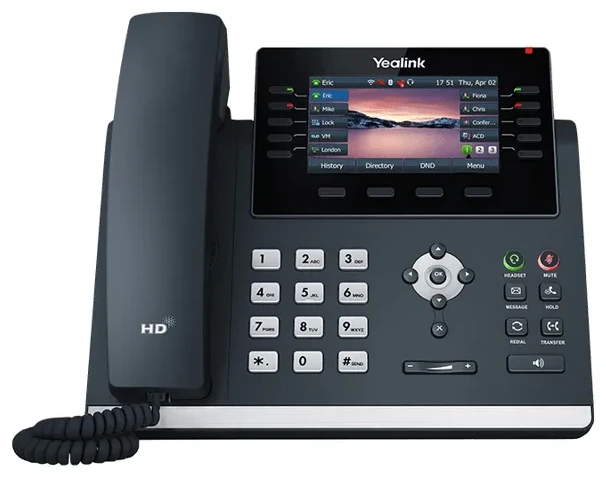
Yealink T46U at a glance
- Screen
- 4.3-inch colour display (480 x 272) with backlight
- Buttons
- 10 programmable buttons with status lights
- Network
- Two Gigabit Ethernet ports, Power over Ethernet (PoE)
- USB
- Two USB ports: USB headset, call recording, Wi-Fi dongle or Bluetooth dongle, any two at once
- Wireless
- Wi-Fi with a Yealink WF40/WF50 dongle; Bluetooth with a BT40/BT41 dongle
- Calls
- Up to 16 phone lines on one set, HD voice with Acoustic Shield noise filtering
- Headsets
- USB headset and EHS wireless-headset support
- Handset
- Hearing-aid compatible (HAC); desk stand included, wall mount optional
Who the T46U is for
Offices that bought T46Us from a previous provider and are switching to Netexem: the phones come with you, we re-provision them in minutes, and the service agreement covers them like our own. It is a solid front-desk and manager's phone, with 10 programmable buttons for colleagues and a screen big enough to read across a desk. When one eventually fails, its slot is filled by a T74W, which looks and works almost the same.
Yealink T46U quick guide
The steps people look up most, in plain words. Menu names match the T46U's own screen.
How to factory reset a Yealink T46U
- With the phone idle, press and hold the OK key for about ten seconds until it asks whether to reset to factory settings, then confirm.
- From the menu instead: Menu > Advanced (default password admin) > Reset Config > Reset to Factory Settings.
- Leave the phone powered on until it has restarted completely.
Note: Once a T46U is on Netexem service it sets itself up again after a reset: back on the network, it downloads its settings and returns with your extension, keys and voicemail. On another provider's service a reset may leave it blank until someone sets it up again.
How to reboot a Yealink T46U
- Go to Menu > Advanced (default password admin) > Reboot, and confirm.
- Or unplug the network cable (or the power adapter) for ten seconds and plug it back in.
- Wait for the home screen; a reboot keeps every setting, unlike a factory reset.
How to find the IP address of a Yealink T46U
- With the phone idle, press the OK key, or go to Menu > Status.
- The IPv4 address is on the first line of the status screen, with the firmware version below it.
You need this only to open the phone's web page from a computer on the same network. The web page's default login is admin / admin.
How to transfer a call on a Yealink T46U
- During the call, press the TRANSFER key (or the Trans soft key).
- Dial the extension or number, or pick a contact from Directory.
- To hand it over straight away, press B Transfer; to announce the caller first, press Send, wait for the answer, then press TRANSFER again.
On Netexem service a colleague key does it in one press: tap their name during the call.
How to connect a Yealink T46U to Wi-Fi
- Plug a Yealink WF40 or WF50 Wi-Fi dongle into a USB port on the back of the phone; the phone offers to scan for networks.
- Select OK, set Wi-Fi to On and select Save.
- Pick your network, select Connect, type the password and confirm.
Without the dongle the T46U is a wired phone. On Wi-Fi it needs a power adapter, since no cable means no PoE.
How to pair a Bluetooth headset with a Yealink T46U
- Plug a Yealink BT40 or BT41 Bluetooth dongle into a USB port and put the headset in pairing mode.
- Go to Menu > Basic > Bluetooth and select Scan.
- Pick the headset and select Connect. The Bluetooth icon appears on the screen.
Voicemail, call forwarding, hold, conference calls and intercom work the same on every Netexem phone; see the Netexem phone system user guide.
The full Yealink manual covers every feature; the T46U datasheet lists the specifications. Netexem customers can simply call 714.444.0550 and we walk you through it.
Yealink T46U compared
T46U vs T74W
T74W: $169
Netexem's recommended replacement: the same 4.3-inch screen and 10 programmable buttons, with Wi-Fi 6 and Bluetooth 5.0 built in instead of by dongle.
T46U vs T54W
T54W: $169
The T5-series equivalent with built-in Wi-Fi and Bluetooth 4.2, also a special order now.
T46U vs T73W
T73W: $119
A smaller 2.8-inch screen with 8 programmable buttons and built-in wireless, for a desk that needs fewer buttons.
See every model side by side on the Yealink phones page.
Netexem service and what's included
Your T46Us keep working when you switch to Netexem; there is no need to buy new phones. It runs on Netexem's business phone service at $19.99 or $29.99 per user per month, fixed, with no long-term contract. Installation, staff training and number porting are free, and every install carries a 30-day money-back guarantee from the install date. The pricing page has the full breakdown.
- Bring your own T46Us: they work on Netexem service as they are, and our service agreement covers them too. When one fails, we replace it with a T74W.
- Power: through the network cable (PoE), which we recommend. A power adapter is $5 and is needed if the phone runs on Wi-Fi.
- Buying new: the T46U is a special order at $169; call 714.444.0550 and we source it for you, or choose the T74W at the same price.
Details on all of this are in the phone system user guide.
Yealink T46U questions
Can I keep my Yealink T46U phones if I switch to Netexem?
Yes. T46Us work on Netexem service as they are, with no upgrade needed, and a Netexem service agreement covers them like phones we supply. Service is $19.99 or $29.99 per user per month, fixed, with free setup, training and number porting and no long-term contract.
What is the default password on a Yealink T46U?
The factory default admin password is admin, for the phone's Advanced menu and its web page. On Netexem service the default voicemail password is 1234#; change it after your first login.
Is the Yealink T46U end of life?
As of October 2026 the T46U is not on Yealink's public end-of-life list, but Netexem no longer stocks it: it is a special order, and for new desks we recommend the Yealink T74W, its current equivalent. We keep supporting every T46U in use, and on a service agreement we replace a failed one with a T74W.
What is the difference between the Yealink T46U and T46S?
The T46U is the later model: two USB ports instead of one, the Opus codec and Acoustic Shield noise filtering, and Wi-Fi or Bluetooth through a dongle. The screen, keys and layout are the same, so staff moving from a T46S need no retraining.
What is the difference between the Yealink T46U and T74W?
Same screen size and 10 programmable buttons. The T74W is the current T7 series with Wi-Fi 6 and Bluetooth 5.0 built in and a faster processor; the T46U needs USB dongles for either. Netexem sells the T74W new for $169 and special-orders the T46U at the same $169.