
Yealink W70P
Yealink phones › W70P
Yealink W70P Cordless Phone
The Yealink W70P is a cordless phone kit, a W70B base station with a W56H handset, that puts the office number in the pocket of someone who is never at a desk, for $129 or free with a service agreement, sold and installed by Netexem in Tustin for businesses across Orange County and Southern California. Call 714.444.0550 for a quote.
It is Netexem's Top Pick for staff who move: one base takes up to ten handsets and twenty calls at once, a handset talks for 30 hours on a charge, and the handsets ring each other for free. Below are the specs, who it suits, how to add a handset and transfer a call, and how it compares.
Reviewed by Joey B, Technician, Netexem · November 2026
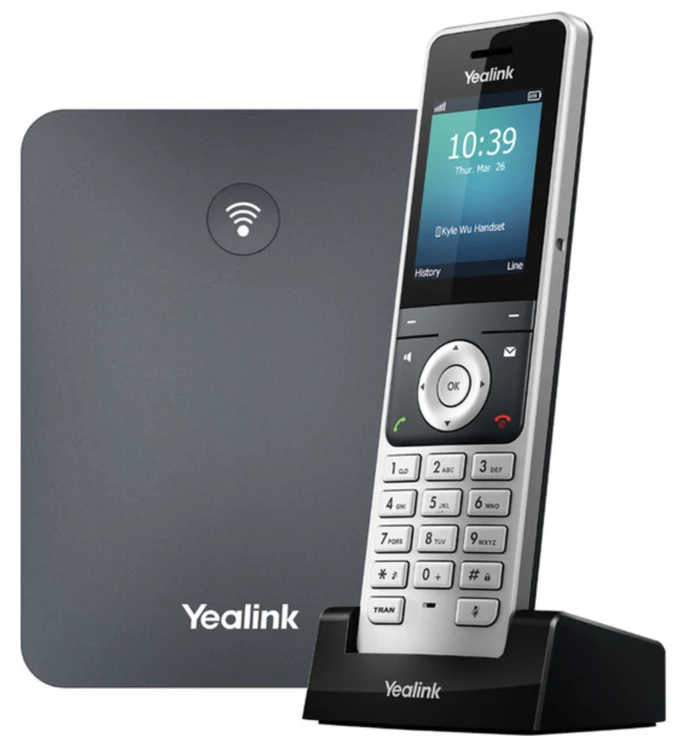
Yealink W70P at a glance
- Kit
- One W70B base station plus one W56H handset with charger cradle (Yealink sells this kit as the W76P); add W56P handsets later
- Handsets and calls
- Up to 10 handsets on one base, 20 calls at once, 2 calls per handset, 10 phone lines
- Range
- About 160 ft (50 m) indoors and 1,000 ft (300 m) outdoors from the base; up to 6 RT30 repeaters extend it
- Battery
- Up to 30 hours of talk time and 400 hours of standby; 10 minutes on the cradle gives 2 hours of talk
- Screen
- 2.4-inch colour display (240 x 320) with a backlit keypad
- Calls
- Hold, transfer, 3-way conference, intercom between handsets, call forward, voicemail light, mute
- Audio
- HD voice, full-duplex speakerphone, hearing-aid compatible (HAC), 3.5 mm headset jack
- Base
- One 10/100 Ethernet port, Power over Ethernet (PoE) or its adapter; desk stand or wall mount
Who the W70P is for
A dental or medical clinic where the front desk walks back to the rooms, an auto shop or tire store where the person who answers is under a car, a warehouse or a retail floor, a restaurant kitchen, a property manager walking a building. One base covers about 160 feet indoors; a bigger site adds repeaters or a second base. The handset also suits an owner who wants to answer the shop line from the back office or the yard. Someone who stays at one desk does better with a desk phone and, if they want their hands free, a WH64 headset.
Yealink W70P quick guide
The steps people look up most, in plain words. Menu names match the W70P's own screen.
How to register a new handset to a Yealink W70P base
- Press and hold the button on the front of the W70B base until its registration light flashes; it stays open for 90 seconds.
- On the new handset, press the Reg soft key when the screen says Unregistered, or go to OK > Settings > Registration > Register Handset and pick the base (default PIN 0000).
- The handset shows Handset Subscribed and its number, such as 2, at the top of the screen.
A Netexem W70P arrives with its handset already registered. You need this only for an extra W56P handset you add yourself, or after a reset.
How to transfer a call on a Yealink W70P handset
- During the call, press Options and pick Transfer, or press the TRAN key.
- Dial the extension, such as 1001, or open Directory and pick a name.
- Press Transfer straight away to hand the call over, or wait for the answer, announce the caller, then press Transfer.
How to call another handset on a Yealink W70P (intercom)
- From the idle screen press OK, then pick Intercom.
- Choose the handset you want, or All Handsets to ring every one of them.
- Press OK or the green key. The other handset rings as an internal call; it costs nothing and never leaves the building.
To reach a Netexem desk phone instead, dial *8 and its extension, for example *8105, and it answers hands free.
How long does a Yealink W70P handset take to charge?
- Stand the handset in its cradle; its light glows red while it charges.
- Ten minutes on the cradle gives about two hours of talk; a full charge gives up to 30 hours of talk or 400 hours of standby.
- The handset keeps working while it charges, so a desk with the cradle on it never runs flat.
How to factory reset a Yealink W70P
- Handset: go to OK > Settings > System Settings > Handset Reset. The handset keeps its registration, directory and call history and clears everything else.
- Base: go to OK > Settings > System Settings > Base Reset and enter the base PIN (default 0000). The base keeps the handset registrations and clears its other settings.
Note: A Netexem base reloads its lines and directory once it is back on the network, but call 714.444.0550 first; most problems are fixed remotely without a reset.
Voicemail, call forwarding, hold, conference calls and intercom work the same on every Netexem phone; see the Netexem phone system user guide.
The full Yealink manual covers every feature; the W70P datasheet lists the specifications. Netexem customers can simply call 714.444.0550 and we walk you through it.
Yealink W70P compared
W70P vs W56P
W56P: $79
The extra handset with its own cradle. Buy the W70P kit first, then add a W56P for each person who needs one, up to ten on the base.
W70P vs T31P
T31P: $50
The cheapest desk phone: a wired set for a fixed desk. The W70P costs more because it walks the floor with the person.
W70P vs WH64
WH64: $165
A wireless headset for someone who stays near one desk and wants both hands free; the W70P is for someone who leaves the desk altogether.
See every model side by side on the Yealink phones page.
Netexem service and what's included
$129 one-time for the base and first handset on the month-to-month plan, or free when you sign a service agreement. It runs on Netexem's business phone service at $19.99 or $29.99 per user per month, fixed, with no long-term contract. Installation, staff training and number porting are free, and every install carries a 30-day money-back guarantee from the install date. The pricing page has the full breakdown.
- In the box: the W70B base station with stand, one W56H handset with battery and belt clip, its charger cradle, two power adapters, a network cable and the quick start guide.
- Power: the base runs through the network cable (PoE) or its adapter; the cradle needs a power outlet near the desk.
- Warranty: Yealink's 1-year limited manufacturer warranty, extended by a Netexem service agreement; we swap a faulty base or handset for you.
- Delivery: we bring it to the install, or ship it to your office anywhere in the US if you install yourself.
- Already own a W70P: bring it: the base and its handsets work on Netexem service as they are, and our service agreement covers them too.
Details on all of this are in the phone system user guide.
Yealink W70P questions
How much is the Yealink W70P from Netexem?
$129 one-time for the base and first handset on the month-to-month plan, or included free with a service agreement; each extra W56P handset is $79. Phone service is $19.99 or $29.99 per user per month, fixed, with free installation, training and number porting and no long-term contract.
How many handsets and how far does the Yealink W70P reach?
One base takes up to 10 handsets and carries 20 calls at the same time. Yealink rates the range at about 160 feet indoors and 1,000 feet outdoors from the base; walls and metal shelving shorten it. A warehouse or a big clinic adds up to six RT30 repeaters, or a second base on another cable.
What is the difference between the W70P and the W56P?
The W70P is the starter kit: the W70B base station plus one W56H handset and cradle. A W56P is an extra handset with its own cradle, no base. Every office needs one W70P, then one W56P per additional person.
Will the Yealink W70P work in a warehouse or a shop floor?
Yes, that is what it is for: staff carry the handset, calls to the main number ring in their pocket, and intercom between handsets is free. We place the base centrally and add a repeater where the signal drops; a site visit tells us how many before you buy.
Who installs the Yealink W70P?
A Netexem technician from our Tustin office installs it anywhere in Orange County and Southern California, places the base where the signal covers the building, registers every handset and shows your staff the handset. If you install yourself, we ship it to your office anywhere in the US and guide you by phone.