
Yealink WH64
Yealink phones › WH64
Yealink WH64 Wireless Headset
The Yealink WH64 is a wireless office headset that does both DECT and Bluetooth, so one headset works with your desk phone, your computer and your cell. Netexem in Tustin sells and sets it up for offices across Orange County and Southern California: Mono (one ear) $165, Dual (both ears) $185, or free with a service agreement. Call 714.444.0550.
It replaces the tangle of a phone headset plus a separate computer headset with one that switches between them from the base. Below: the two versions, the specs, who each suits, how to pair and connect it, and how it compares with the WH64 Workstation and the UH33.
Reviewed by Joey B, Technician, Netexem · October 2026
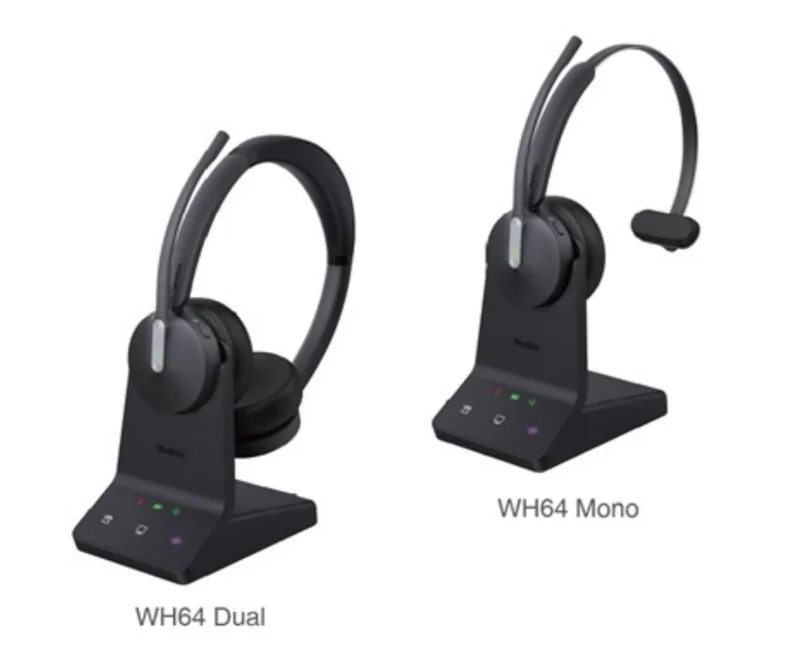
Yealink WH64 at a glance
- Versions
- Mono (one ear) $165 or Dual (both ears) $185
- Wireless
- DECT and Bluetooth 5.2 in one headset; DECT range up to 606 ft, Bluetooth up to 164 ft
- Talk time
- DECT: up to 14 h (Mono) or 16 h (Dual); Bluetooth: up to 26 h (Mono) or 32 h (Dual)
- Charging
- 1.5 hours on the base; standby 157 h (Mono) or 195 h (Dual)
- Noise
- Three microphones with Acoustic Shield 2.0 to block background noise
- Base
- USB ports for a desk phone and a computer at the same time, plus a busylight port
- Busylight
- Built-in light on the headset shows when you are on a call; optional BLT60 desk light
- Weight
- Headset 92 g (Mono) or 151 g (Dual); boom arm adjusts 280 degrees
Who the WH64 is for
Anyone who takes calls on a desk phone and a computer: a receptionist who also joins Teams meetings, an office manager who roams the suite on DECT and takes a cell call on Bluetooth on the way, a sales desk that lives on the headset all day. Choose Mono where you need to hear the room, Dual where the room is loud or you are on calls for hours. For a desk that only ever uses the computer, the corded UH33 does the job for less.
Yealink WH64 quick guide
The steps people look up most, in plain words. Menu names match the WH64's own screen.
How to pair a Yealink WH64 with its base
- Plug the base in and sit the headset in the charging cradle. Docking it pairs the headset to the base; charge 30 minutes before first use.
- Lift the headset and press the call button to take it off the cradle and start talking.
- If the headset ever loses the base, dock it again and it re-pairs on its own.
How to connect a Yealink WH64 to a desk phone and a PC
- Desk phone: run the USB cable from the base to the USB port on the back of the Yealink phone. Netexem phones recognise it as a headset with no setting to change.
- Computer: run the second USB cable from the base to the PC, then pick the WH64 as the speaker and microphone in Teams, Zoom or your softphone.
- Both can stay connected; the base switches to whichever device has the call.
A non-Yealink desk phone needs the optional EHS62 adapter to answer and hang up from the headset.
How to pair a cell phone with a Yealink WH64 over Bluetooth
- Turn Bluetooth on at the base and set it to pairing.
- On the cell phone, pick the WH64 from the Bluetooth list.
- Up to two Bluetooth devices can be paired at once, so a cell phone and a laptop can share the headset.
How to mute and unmute a Yealink WH64
- Press the mute button on the headset during a call; the busylight stays on so colleagues still see you are busy.
- Press it again to unmute.
- Press the call button once to answer a call and once more to end it.
Voicemail, call forwarding, hold, conference calls and intercom work the same on every Netexem phone; see the Netexem phone system user guide.
The full Yealink manual covers every feature; the WH64 datasheet lists the specifications. Netexem customers can simply call 714.444.0550 and we walk you through it.
Yealink WH64 compared
WH64 vs WH64 Workstation
WH64 Workstation: $215
The same headset on a 4-inch touchscreen base that doubles as a hands-free speaker and a USB hub for your computer.
WH64 vs UH33
UH33: $35
A corded USB headset with inline call buttons, for a desk that only uses the computer and needs no wireless.
See every model side by side on the Yealink phones page.
Netexem service and what's included
WH64 Mono is $165 and WH64 Dual is $185 one-time on the month-to-month plan, or included free when you sign a service agreement. It runs on Netexem's business phone service at $19.99 or $29.99 per user per month, fixed, with no long-term contract. Installation, staff training and number porting are free, and every install carries a 30-day money-back guarantee from the install date. The pricing page has the full breakdown.
- In the box: headset, WHB640 base, power adapter, USB-C and Micro-USB cables, a drawstring bag and the quick start guide.
- Warranty: Yealink's 1-year limited manufacturer warranty, extended by a Netexem service agreement; we swap a faulty headset for you.
- Delivery: we bring it to the install, or ship it to your office anywhere in the US.
- Already own a WH64: bring it: it works with Netexem phones as it is, and the service agreement covers it too.
Details on all of this are in the phone system user guide.
Yealink WH64 questions
How much is the Yealink WH64 from Netexem?
WH64 Mono is $165 and WH64 Dual is $185, one-time, on the month-to-month plan; with a service agreement the headset is included free. Both work with any Yealink desk phone Netexem installs.
Should I choose the WH64 Mono or Dual?
Mono covers one ear, so a receptionist still hears the office; Dual covers both ears and shuts out a noisy room, with longer talk time. Dual is the usual choice for someone on calls most of the day.
What is in the box with the Yealink WH64?
The headset, the WHB640 base, a power adapter, a USB-C to USB-A cable, a Micro-USB to USB-A cable, a drawstring bag and the quick start guide.
What is the difference between the Yealink WH64 and the WH64 Workstation?
The headset is the same. The WH64 Workstation adds a 4-inch touchscreen base that works as a hands-free speaker and a USB hub for your computer: $215, against $165 (Mono) or $185 (Dual) for the WH64.
Does the Yealink WH64 work with a computer?
Yes. The base connects to a PC by USB and works with Teams, Zoom and softphones; a Teams-certified version exists. The base can connect to a desk phone and a PC at the same time.