
Yealink T34W
Yealink phones › T34W
Yealink T34W Desk Phone
The Yealink T34W is Netexem's Top Pick for a basic desk: a 2.4-inch colour screen, 4 programmable buttons and built-in Wi-Fi for $80, or free with a service agreement, sold and installed by Netexem in Tustin for offices across Orange County and Southern California. Call 714.444.0550 for a quote.
It is the phone for the desks that need to ring, answer and transfer and nothing more, with Wi-Fi so it can sit anywhere in the office. This page has the specs, who it suits, the setup steps people look up, and how it compares with the T33G and T73W.
Reviewed by Joey B, Technician, Netexem · October 2026
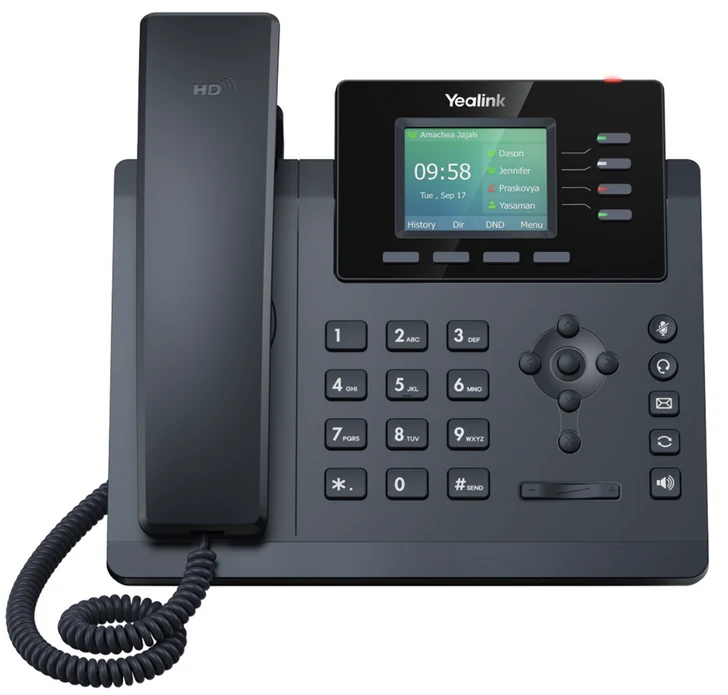
Yealink T34W at a glance
- Screen
- 2.4-inch colour display (320 x 240) with backlight
- Buttons
- 4 programmable buttons
- Wireless
- Built-in dual-band Wi-Fi (2.4 GHz and 5 GHz); Bluetooth headsets via a Yealink BT50/BT51A USB adapter
- Network
- Two Gigabit Ethernet ports, Power over Ethernet (PoE)
- USB
- USB 2.0 for a wired USB headset or the Bluetooth adapter
- Calls
- Up to 4 phone lines on one set, local 5-way conference, HD voice
- Headsets
- EHS35 support for Yealink wireless headsets
- Mounting
- Adjustable multi-angle stand included, wall mount optional
Who the T34W is for
Break rooms, exam rooms, a shared workstation, a shop counter or the extra desk in the corner: anywhere a phone has to be there but nobody lives on it all day. Four programmable buttons cover the main line and a couple of colleagues; the colour screen shows who is calling; Wi-Fi saves running a cable. A front desk that holds and transfers calls all day, or anyone who wants a Bluetooth headset without an adapter, should look at the T73W or T74W instead.
Yealink T34W quick guide
The steps people look up most, in plain words. Menu names match the T34W's own screen.
How to connect a Yealink T34W to Wi-Fi
- Go to Menu > Settings > Basic Settings > Wi-Fi.
- Set Wi-Fi to On and select Save. The phone scans for networks.
- Pick your network, select Connect, type the password and confirm. Check Wi-Fi Status in the same menu if you are unsure it connected.
On Wi-Fi the phone gets no power through a cable, so it needs the $5 power adapter. A cable is still the most reliable choice where one exists.
How to factory reset a Yealink T34W
- With the phone idle, press and hold the OK key until it asks whether to reset to factory settings, then confirm.
- From the menu instead: Menu > Settings > Advanced Settings (default password admin) > Reset Config > Reset to Factory Settings > Reset > OK.
- Leave it powered on until it has restarted completely.
Note: A Netexem T34W sets itself up again after a reset: back on the network, it downloads its settings and returns with your extension, keys and voicemail. Call 714.444.0550 first; most problems are fixed remotely.
How to find the IP address of a Yealink T34W
- With the phone idle, press the OK key, or go to Menu > Status.
- The IPv4 address is on the first line of the status screen, with the firmware version below it.
You only need this to open the phone's web page from a computer on the same network. On Netexem service we handle that for you.
How to wall mount a Yealink T34W
- Remove the desk stand and fit the optional wall-mount bracket to the back of the phone.
- Run the network cable through the bracket and hang the phone on two screws.
- Turn the small tab under the handset cradle so the handset holds when the phone is vertical.
Say so when you order and the technician brings the bracket.
Voicemail, call forwarding, hold, conference calls and intercom work the same on every Netexem phone; see the Netexem phone system user guide.
The full Yealink manual covers every feature; the T34W datasheet lists the specifications. Netexem customers can simply call 714.444.0550 and we walk you through it.
Yealink T34W compared
T34W vs T73W
T73W: $119
The next step up: a 2.8-inch screen, 8 programmable buttons and built-in Bluetooth, for a desk that transfers more calls.
T34W vs T33G
T33G: $70
Same 2.4-inch colour screen with Gigabit ports but no Wi-Fi: $10 less for a desk that always has a cable.
T34W vs T54W
T54W: $169
A 4.3-inch screen with 10 programmable buttons, Wi-Fi and Bluetooth: the manager's phone, now a special order.
See every model side by side on the Yealink phones page.
Netexem service and what's included
$80 one-time per phone on the month-to-month plan, or included free when you sign a service agreement. It runs on Netexem's business phone service at $19.99 or $29.99 per user per month, fixed, with no long-term contract. Installation, staff training and number porting are free, and every install carries a 30-day money-back guarantee from the install date. The pricing page has the full breakdown.
- In the box: the phone, handset and cord, stand and a network cable. The wall-mount bracket and Bluetooth adapter are optional.
- Power: through the network cable (PoE), which we recommend. A power adapter is $5 and is needed if the phone runs on Wi-Fi.
- Warranty: Yealink's 1-year limited manufacturer warranty, extended by a Netexem service agreement; we swap a faulty phone for you.
- Delivery: we bring the phones to the install, or ship them to your office anywhere in the US if you install yourself.
- Already own T34Ws: bring them: they work on Netexem service as they are, and our service agreement covers them too.
Details on all of this are in the phone system user guide.
Yealink T34W questions
How much is the Yealink T34W from Netexem?
$80 one-time per phone on the month-to-month plan, or included free with a service agreement. Phone service is $19.99 or $29.99 per user per month, fixed, with free installation, training and number porting and no long-term contract.
Does the Yealink T34W have Bluetooth?
Not built in. Its USB port takes a Yealink BT50 or BT51A Bluetooth adapter for a wireless headset, or a wired USB headset directly. If Bluetooth matters, the T73W has it built in for $39 more.
Does the Yealink T34W support PoE?
Yes. With a PoE switch the network cable powers the phone. On Wi-Fi, or without PoE, it needs the 5 V power adapter, which Netexem supplies for $5.
What is the difference between the Yealink T34W and T33G?
Wi-Fi. The T34W has dual-band Wi-Fi built in and a USB port; the T33G is the same 2.4-inch colour phone for a wired desk. Both have 4 programmable buttons and Gigabit ports.
Who installs the Yealink T34W?
A Netexem technician from our Tustin office installs it on site anywhere in Orange County and Southern California and trains your staff on install day. If you install yourself, we ship the phones to your office anywhere in the US; the phone sets itself up when plugged in and we guide you by phone or screen share.